AI Agents Explained: How Autonomous AI Is Changing Software Development

Artificial intelligence has moved beyond systems that only answer questions. A newer approach focuses on AI agents: systems that can understand a goal, decide what steps are needed, use available tools, and evaluate the results.
AI agents are becoming an important topic in software development because many development tasks involve more than producing a single piece of code. Developers often need to understand requirements, inspect existing code, run tests, find errors, make changes, and verify the final result.
This article explains how AI agents work, how they differ from traditional chatbots, and where they can fit into modern software development.
What Is an AI Agent?
An AI agent is a software system that can work toward a specific goal by making decisions and taking actions based on the information available to it.
A simple AI system may work like this:
User
  ↓
Question
  ↓
AI Model
  ↓
Answer
An AI agent usually follows a more involved process:
Goal
  ↓
Understand the task
  ↓
Create a plan
  ↓
Take an action
  ↓
Observe the result
  ↓
Make a decision
  ↓
Take another action
  ↓
Verify the result
The important difference is that an agent can participate in a loop of reasoning and action rather than producing only one response.
For example, if an agent is given the goal of fixing a failing test, it may:
Read the error message.
Inspect the relevant source files.
Identify a possible cause.
Modify the code.
Run the test again.
Examine the result.
Make another change if necessary.
Stop after the problem has been verified or the task cannot be completed.
How Is an AI Agent Different From a Chatbot?
A chatbot generally responds to a user's input. It can explain concepts, generate text, answer questions, or produce code.
An agent can have a broader workflow.
| Chatbot | AI Agent |
|---|---|
| Usually responds to a prompt | Works toward a defined goal |
| Primarily generates responses | Can plan and take actions |
| Often follows a single interaction | Can perform multiple steps |
| May not use external tools | Can use tools when available |
| Usually stops after responding | Can evaluate results and continue |
This does not mean that every AI agent is completely autonomous. The amount of autonomy depends on how the system is designed.
An agent can be configured to ask for human approval before important actions, or it can be allowed to perform routine actions automatically.
The Main Components of an AI Agent
An AI agent can contain several components that work together.
1. AI Model
The AI model provides the reasoning and language capabilities of the system.
It can help the agent:
Understand instructions
Analyze information
Generate plans
Interpret tool results
Decide what to do next
Produce a final response
The model is only one part of the agent. The surrounding system determines what the model can actually do.
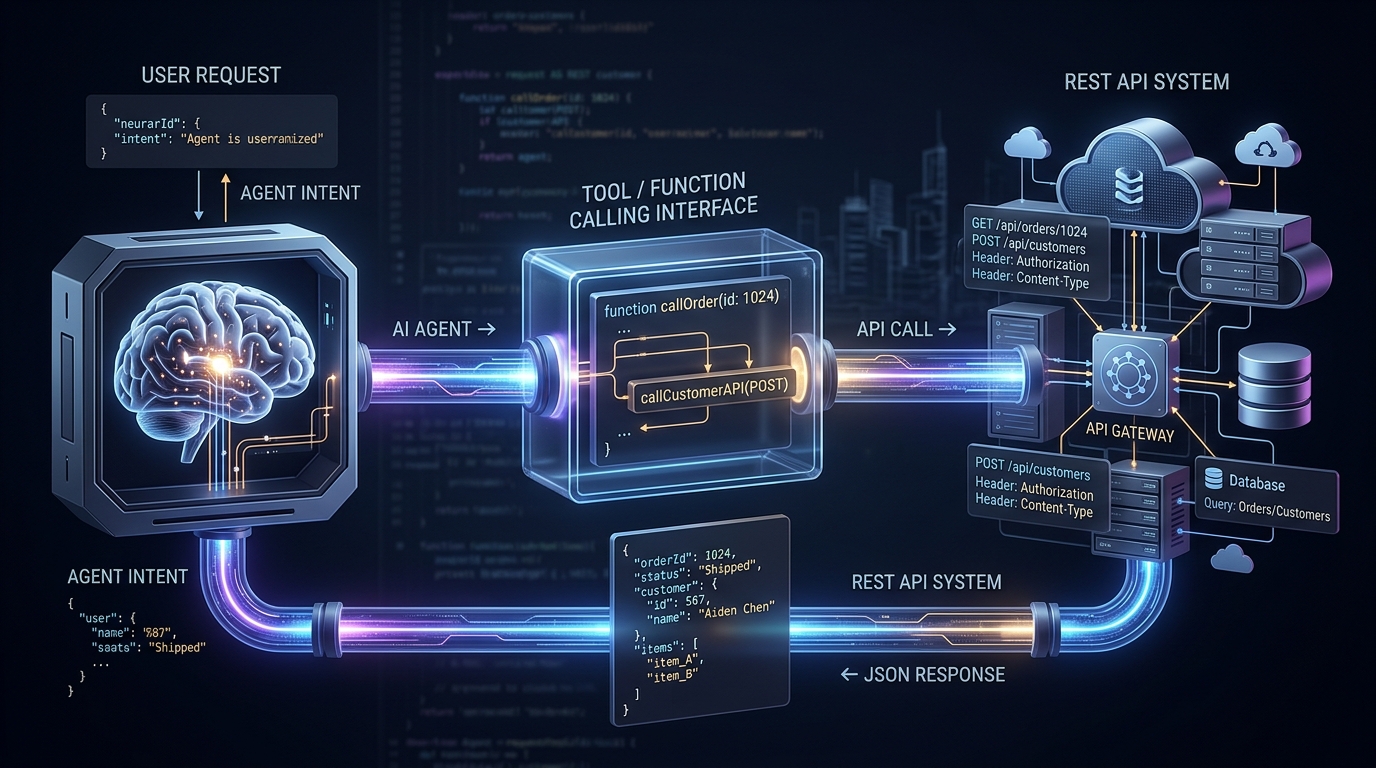
2. Tools
Tools allow an agent to interact with external systems.
Examples include:
File systems
Databases
Web services
APIs
Code execution environments
Testing frameworks
Development tools
Without tools, an agent may be limited to generating suggestions. With tools, it can potentially perform actions and inspect their results.
3. Memory
Memory allows an agent to retain useful information during or across tasks.
There are different forms of memory.
Short-term memory can contain the current conversation, task information, and recent tool results.
Long-term memory can store information that may be useful in future interactions, depending on how the system is designed.
Memory can make complex workflows easier to manage because the agent does not need to reconstruct every detail from the beginning.
4. Planning
Planning allows an agent to break a larger goal into smaller steps.
For example:
Build a feature
      ↓
Understand requirements
      ↓
Inspect existing code
      ↓
Plan implementation
      ↓
Write code
      ↓
Run tests
      ↓
Fix problems
      ↓
Verify implementation
Planning does not guarantee that every step will be correct. The agent still needs feedback and verification.
5. Feedback
Feedback tells the agent what happened after an action.
For example, after changing code, the agent may receive:
Test result:
2 tests passed
1 test failed
The agent can then use that information to decide what to do next.
This feedback loop is one of the important characteristics of agent-based systems.
How Does an AI Agent Work?
A typical agent workflow can be divided into several stages.
Step 1: Receive a Goal
The system receives a task.
For example:
Find the cause of the failing login test
and suggest a fix.
Step 2: Understand the Context
The agent gathers information related to the task.
For a software development task, this might include:
Project files
Error messages
Existing tests
Configuration files
Documentation
Previous tool results
Step 3: Create a Plan
The agent determines which actions may be useful.
For example:
1. Find the failing test
2. Read the related implementation
3. Inspect recent changes
4. Identify the likely cause
5. Make a small change
6. Run the test
7. Evaluate the result
Step 4: Use Tools
The agent may call a tool to perform an action.
For example:
Agent
  ↓
Read source file
  ↓
Analyze code
  ↓
Run test
  ↓
Receive output
Step 5: Observe the Result
The agent examines the result of the action.
If the test passes, the task may be close to completion.
If the test fails, the agent can use the new information to continue investigating.
Step 6: Continue or Finish
The agent decides whether another action is necessary.
This creates a cycle:
Plan
  ↓
Act
  ↓
Observe
  ↓
Evaluate
  ↓
Act again
The process ends when the goal has been completed, a stopping condition has been reached, or human intervention is required.
AI Agents in Software Development
Software development is a natural area for agent-based workflows because development already involves repeated cycles of planning, implementation, testing, and debugging.
An agent may assist with tasks such as:
Exploring an unfamiliar codebase
Generating implementation ideas
Writing small code changes
Creating tests
Running tests
Investigating errors
Reviewing code
Updating documentation
Analyzing logs
The level of automation can vary.
For example, one workflow might allow the agent only to suggest changes:
Developer
   ↓
AI Agent
   ↓
Suggested change
   ↓
Developer reviews
Another workflow could allow the agent to perform actions in a controlled development environment:
Developer
   ↓
AI Agent
   ↓
Modify code
   ↓
Run tests
   ↓
Review results
   ↓
Developer approval
The second approach provides more automation but also requires stronger controls.
AI Agents and Code Generation
Code generation is one of the most visible applications of AI in software development.
A basic code-generation system may receive:
Create a function that validates an email address.
and return a function.
An agent-based system could work with a broader task:
Add email validation to the registration process.
The agent might:
Locate the registration logic.
Inspect the existing validation system.
Find related tests.
Implement the validation.
Add or update tests.
Run the test suite.
Review failures.
Adjust the implementation.
This approach focuses on the development task rather than only generating an isolated code fragment.
AI Agents and Testing
Testing can also benefit from agent-based workflows.
An agent may help:
Generate test cases
Identify missing test coverage
Run automated tests
Analyze failed tests
Compare expected and actual results
Suggest possible fixes
For example:
Code change
   ↓
Run tests
   ↓
Test failure
   ↓
Analyze error
   ↓
Suggest or apply change
   ↓
Run tests again
The repeated testing cycle can be useful for debugging, but the results still need to be checked because an agent may misunderstand the cause of a failure.
AI Agents and Code Review
Code review involves more than checking whether code compiles.
A review may consider:
Readability
Logic
Error handling
Security
Performance
Maintainability
Test coverage
An AI agent can inspect a change and identify areas that deserve attention.
For example:
Pull request
     ↓
Agent reviews changes
     ↓
Finds potential issue
     ↓
Explains the issue
     ↓
Developer evaluates it
The agent's output should be treated as an additional source of analysis rather than an automatic replacement for human review.
How Much Autonomy Should an Agent Have?
One of the most important design decisions is deciding what an agent is allowed to do without human approval.
A simple autonomy model might look like this:
Level 1
Suggestions only

Level 2
Read files and analyze information

Level 3
Make changes in a controlled environment

Level 4
Run tests and iterate automatically

Level 5
Perform broader workflows with defined limits
Higher autonomy can reduce the amount of manual work, but it also increases the importance of permissions, monitoring, testing, and clear stopping conditions.
For low-risk tasks, more automation may be reasonable.
For high-impact actions, human approval can provide an additional layer of control.
Challenges of AI Agents
AI agents introduce several technical challenges.
Incorrect Decisions
An agent can misunderstand a requirement or choose an ineffective approach.
Even when the generated code looks reasonable, it may not solve the actual problem.
Limited Context
Large software projects can contain thousands or millions of lines of code.
An agent cannot always consider the entire project at once. Context selection becomes an important part of agent design.
Security
Tools give agents the ability to interact with systems.
That creates security concerns around:
File access
Credentials
Database access
Network requests
Command execution
Sensitive information
A useful principle is to give an agent only the permissions required for its task.
Verification
An agent may produce a plausible result that is still incorrect.
Verification can include:
Automated tests
Static analysis
Human review
Type checking
Build validation
Security checks
The more important the task, the more valuable independent verification becomes.
Cost and Processing Time
Agent workflows can involve multiple model calls and tool operations.
A simple question may require one response, while a complex development task may require many steps.
This can increase both processing time and resource usage.
What Changes for Developers?
AI agents do not simply change how code is written. They can also change how developers interact with development systems.
Instead of thinking only in terms of:
Write code
developers may increasingly work with:
Define goal
   ↓
Provide context
   ↓
Set constraints
   ↓
Review actions
   ↓
Verify results
This makes task definition and verification important skills.
Developers may spend less time on some repetitive implementation tasks and more time on:
System design
Requirements
Architecture
Testing strategy
Security
Reviewing changes
Managing technical constraints
The actual balance will depend on the type of project and how the tools are integrated.
A Simple Way to Think About AI Agent Development
A useful mental model is:
An AI agent is a system that combines a model with tools, context, memory, and a feedback loop to work toward a goal.
The model provides intelligence.
Tools provide capabilities.
Memory provides context.
Planning provides direction.
Feedback provides information about what happened.
Together, these components create an agent workflow.
              ┌──────────────┐
              │   AI Model   │
              └──────┬───────┘
                     │
        ┌────────────┼────────────┐
        ↓            ↓            ↓
     Memory        Tools       Planning
        │            │            │
        └────────────┼────────────┘
                     ↓
                  Action
                     ↓
                  Result
                     ↓
                  Feedback
                     │
                     └──────→ AI Model
This loop is the foundation of many agent-based systems.
The Future of AI Agents in Software Development
The future of AI agents will likely involve more specialized workflows rather than one system trying to perform every possible task.
Different agents may focus on different areas:
Development Agent
       ↓
Testing Agent
       ↓
Review Agent
       ↓
Documentation Agent
These systems could work independently or as parts of a larger development workflow.
However, greater automation does not remove the need for engineering discipline.
Reliable agent-based systems will still require:
Clear requirements
Controlled permissions
Good testing
Observability
Human oversight where appropriate
Reliable evaluation methods
The main challenge is not simply making an agent capable of taking actions. It is making sure those actions are appropriate, safe, and verifiable.
Conclusion
AI agents represent a shift from simple question-and-answer systems toward software that can work through multi-step tasks.
In software development, an agent can potentially help with code exploration, implementation, testing, debugging, and review. The key difference is the ability to combine reasoning, tools, actions, and feedback into a continuous workflow.
At the same time, AI agents are not automatically reliable. They can make incorrect decisions, misunderstand context, and produce results that require verification.
For developers, the important skill is therefore not only learning how to use AI models but also understanding how to design workflows around them.
As agent-based systems continue to develop, the most useful approach will likely be a combination of automation, clear constraints, testing, and human judgment.